Blog Migration (Jekyll → Custom Blog)
이영수|2026년 3월 23일|8분 읽기
TL;DR
- I hit the limits of running a blog on Velog and a Jekyll-based generator.
- I built a custom blog with the help of AI.
- I implemented all the features I wanted and I'm very satisfied.
Blog Migration
I recently switched my blog to a new system.
Previously, I was using the Jekyll theme Chirpy.
After starting my dev blog on Velog, I switched to a Jekyll-based blog and used it well for about a year.
However, I felt the inconveniences of running a Jekyll blog and decided to build one myself with AI.
Problems with Velog
What were the problems with Velog, the first platform I used? Honestly, there weren't any major issues.
I liked the mint-colored design and the easy access to other people's articles.
However, there was one critical problem — I was dependent on Velog's server status.
For example, imagine I confidently included a blog link or retrospective link in my resume.
What if the interviewer clicks the link and gets a 503 (Service Unavailable)...?
Surprisingly, this actually happened.
Also, as long as I was using a provider, there were things I couldn't do:
- I wanted to post and categorize content beyond just blog posts and categories (casual knowledge, non-dev content)
- I wanted to change themes and customize the design
- I wanted to see a full blog dashboard and statistics
Based on these pain points, I started building my custom blog after joining a company.
Limitations of Jekyll
The reason I chose Jekyll was clear.
I could use a high-quality design and system without much effort.
Additionally, I could customize the design and features if I wanted to.
(Being GitHub-based + connecting my own domain through GitHub Pages was a huge advantage.)
Of course, if you ask "Can't GitHub Pages go down too?" — fair point.
It's just that Velog had some downtime back then, and I figured GitHub would be more reliable.
+Since it's open source, you could build and deploy somewhere other than GitHub Pages if you wanted.
I was doing well customizing it and was satisfied.
But at some point, I started hitting limitations.
Customization is harder than expected
All CSS and styles for posts, main page, sections, headers, etc. were dependent on the Chirpy theme.
To modify these elements, I had to reference specific files in the Chirpy GitHub repo.
(layout.html, post.html, header.html ...)
But these files weren't stored in my repository.
(If you don't customize, it references the original starter's elements.)
This is actually not a problem at all. It's even a smarter approach.
If you're going to follow the default theme, there's no need to store the files in your GitHub repo.
However, in the age of LLMs, this approach became very inefficient.
- The relevant files don't exist locally.
- Since the files aren't there, asking the AI to modify them leads to incorrect outputs.
- Even with web searches, it often fails to retrieve what you intend.
- Everyone's setup is too different.
When I looked for features I wanted, every blog had wildly different configurations.
For example, when trying to implement a feature that shows English posts to users who selected English:
I had to look at about 2 extension plugin GitHub repos and choose one myself.
And the guides for using them were very poor.
Jekyll is a custom blog generator.
→ Chirpy is a theme for Jekyll.
→ It's one of the extensions for that theme.
→ Each guide describes different configuration methods. ☠️
Of course, the issues above might stem from my lack of understanding of Jekyll + Chirpy theme.
No back-office features
Velog had back-office features that improved user convenience:
- Post creation: right-side preview, thumbnail settings, and description writing
- Category management
- Thumbnail selection
But with Jekyll, I had to manually edit the frontmatter of markdown files through an editor.
→ This caused a lot of inconvenience and management difficulties.
I tried to solve some of this through GitHub Actions:
- Drafting frontmatter via LLM
- Generating thumbnails via LLM
- Translation and post publication preparation via LLM
And managing non-code content through editors and files alone became a major hassle.
=> Eventually, I felt the limitations of scattered management.
Building a Custom Blog
Since LLM development has been progressing so rapidly, I thought
"Even without knowing frontend at all, couldn't it implement the features I want?" and went ahead.
And the result is about 90% satisfactory.
The remaining 10% are parts where the AI couldn't implement perfectly on the first try despite providing specs.
(Events, styles, detailed aspects)
I set up with the most popular stack: Next.js + Vercel.
I figured AI would be well-trained on it, and it would be easy to maintain in the future.
Also, the free options Vercel provides were quite decent:
- Up to 100GB of traffic allowed
- Deployment with GitHub integration and Slack Integration
- Serverless, so no management needed
- Logs and dashboard info provided in reasonable detail
- Preview feature (GitHub Actions only provides one page, so you had to use workarounds...)
Since I was going with Vercel, Next.js made sense (Vercel auto-detects it),
and considering API Routes, image optimization, and flexible rendering, I finalized on Next.js.
For the implementation flow, I decided to improve the design gradually.
I designed the migration of the existing style + features I wanted in PRD format using PLAN mode,
then had Claude Code implement it based on the specs.
Due to token limits, I took it easy and implemented most features I wanted in 2 days.
I kept requesting small details for improvement along the way. It took about 5 days total.
To summarize the plan:
- Existing style and features
- Back-office features
- Customization to my liking
I especially focused on the back-office features.
Existing Style and Features
I liked the existing features, so I asked to replicate them as-is.
- Left sidebar section
- Dark mode
- Language-specific posts based on user's selected language
- Archive / Categories / Tags
Back-office

I implemented features for local blog management.
- Features for statistics and SEO management
- Thumbnail generation + translation + review via LLM
- Post creation and editing
- Import/Export from Obsidian
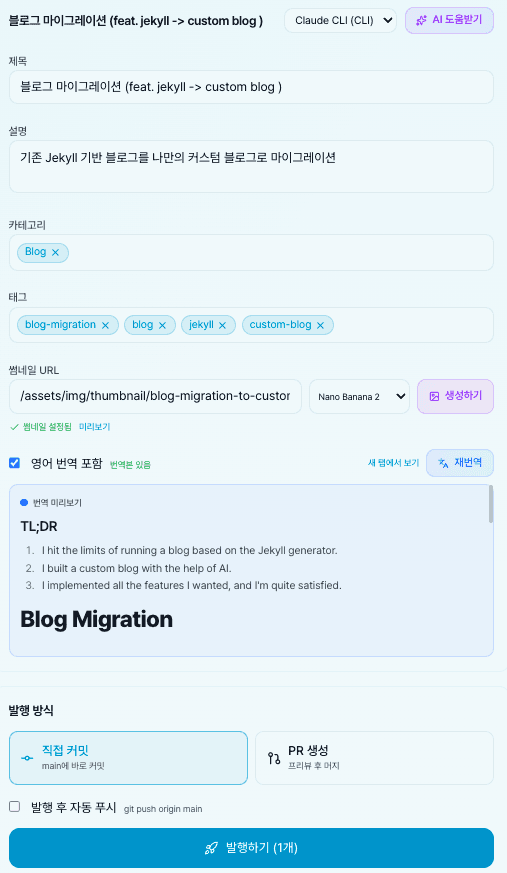
I made it easy to do translation and thumbnail generation from the back-office, which I previously did through GitHub Actions.
Also, through the gh CLI, I can directly commit written content or create PRs for deployment.
Customization
In the left sidebar, Articles, Library, Notes, Activities are elements I added that didn't exist in the original Jekyll setup.
I added them because I felt they were necessary.
- Articles: A place to organize interesting YouTube videos and tech blog content
- Library: A place to casually write about books, movies, music, and life experiences — non-dev content
- Notes: A place to relieve the pressure that blog content must be polished + to follow Lean Learning
- Activities: A place to record places and memories — non-dev content
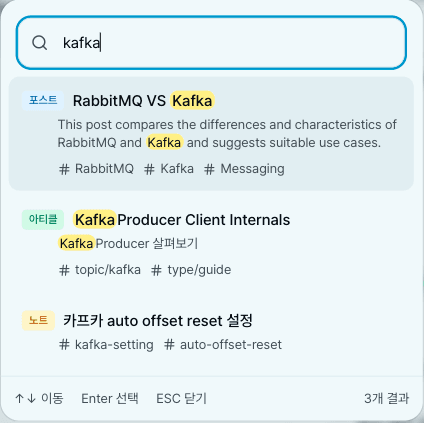
I implemented integrated search so all these elements are searchable.
I should try semantic search or similarity search later.
Conclusion
There might still be parts that don't work properly.
There are aspects I continue to improve.
But being able to implement features exactly as I want is truly amazing.
The reduction in execution cost is really noticeable.
If I had tried this in the past?
- Learning TypeScript and Next.js
- Exploring and learning the basics of required libraries
- Googling and compilation debugging whenever errors occurred during implementation
- Adjusting styles bit by bit
It could have taken over a month.
In the future, things will probably advance beyond imagination...?
If you care about managing your blog or want to experience the pace of LLM development, I'd recommend trying a lightweight project like this.
Migration Tips
Some tips:
- Start by sampling a blog theme you like (e.g., screenshots/URLs of your current blog or reference blog URLs)
- Build the basic structure based on that (verify with fake data)
- Once complete, migrate previous data to the new format
- Implement additional features
If you implement too many features before migrating, you might get lost during migration.
If you migrate too early, every code change might propagate issues.
I believe the design can always be finished in one go once everything else is done.
Don't stress about making it pretty and detailed from the start.
Wrapping Up
And the biggest achievement is just giving it a try! Be confident and let's go!
空