Learning GitHub from Basics (2) - Organizing Commands Step by Step
이영수|2024년 8월 27일|7분 읽기
This post has been translated from Korean to English by Gemini CLI.
This content consists of commands that can be used in projects.
If there are any incorrect contents or commands that need to be added, please leave a comment or contact me at joyson5582@gmail.com!
Still referencing the content.
- Git Command Collection for Beginners (1)
- Git Command Collection for Beginners (2)
- Git, GitHub Command Usage Tips
Git Config
- git config --list
Outputs a list of configs. (Add --global, --local, --system to query each scope)
- git config --get XXX
Gets only a specific config.
- git config
[Scope]keyvalue
Sets a specific config.
- git config
[Scope]--unsetkey
Removes a specific config.
Git Init / Clone
- git init: Makes a directory that has not yet started version control into a Git repository.
If it exists? -> Reinstalls as Reinitialized existing Git repository. (Maintains existing data, but some configuration files may be initialized)
- git clone: Clones an existing remote repository to a local repository.
-o<name>: Specifies the name of the remote repository to be received asnameinstead oforigin-b<branch-name>: Clones based on a specific branch
Git remote
- git remote add/remove XXX
Adds/removes a remote repository reference from the local repository.
- git remote rename old new
Changes the name of the remote repository.
- git remote -v show
<remote name>
Outputs the status of the remote.
* remote upstream
  Fetch URL: https://github.com/youngsu5582/project-test.git
  Push  URL: https://github.com/youngsu5582/project-test.git
  HEAD branch: main
  Remote branches:
    1-issue-assgin tracked
    develop        tracked
    feat/#145      tracked
Like this.
Git Push
-
git push -u
<remote name><branch name>: Connects a local branch to a remote branch -
git push -f
<remote name><branch name>: Forcibly overwrites changes in a remote branch
(git push --force-with-lease: Allows only when the remote branch has not changed as expected) -
git push
<remote name>--delete<branch name>: Deletes a branch from a remote repository. -
git push --dry-run
<remote name><branch name>: Checks what operations will be performed without actually applying changes
(Informs whether a new branch is created, what commit hash is left, etc.)
Git Fetch, Pull
Git Fetch may be somewhat unfamiliar.
Fetch retrieves changes from a remote repository.
It is said that git fetch can prevent conflicts before merging or pushing.
How..?
- git fetch -> git log origin/feat#XXX
At this time, you can check how it is uploaded to the remote.
- git fetch --prune
Deletes branches that do not exist in the remote repository.
(Deletes unnecessary branches remaining locally)
- git pull
<remote name><branch name>
git pull is a combination of git fetch + git merge.
At this time, you will also be curious about the difference between merge and rebase.
Git Merge
It is the act of combining two branches into one.
Creates a merge commit by integrating the commits of the merged branch into the current branch.
(The commit message that we often see when git pull origin develop occurs because of this git pull origin XXX.)

It works as shown in the picture. (Therefore, what we often upload, Pull Request, also means - requests git pull (fetch + merge).)
Unless it is a situation where you absolutely have to git pull origin xxx in the working branch, it is better not to do it.
Git Rebase
A method of reapplying commits from one branch on top of the latest commit of another branch.
History remains linear.

This is not always good, as it loses the history of merging or branching and working.
Don't just pull, use rebase when necessary.
Working Folder
GitHub manages local repository files in three stages.
- Working folder: The directory where actual files of the local repository are stored
- Staging area: A space to add files to be committed
- .git directory: A space where snapshots are stored after commits are completed
Based on these stages, GitHub allows us to return to previous files at any time, even if we are working on multiple branches.
Git Add / Git Restore
IDEA makes it so convenient that I don't know much about the existence of git add and git restore, but these are also important commands.
- git add: Moves to the staging folder.
- git restore: Removes what has been worked on in the current working space. (i.e., reverts the changes)
- git restore --staged: Removes from the staging folder.
Git Status
Shows the current version control status.
At this time, if a file that was previously under Git's control has been modified, it appears as modified, and files that are not under Git's control appear as Untracked files.
If you add an untracked file using git add ...? -> It appears as new file.
If you remove a newly added file using git restore --staged ...? -> It is removed again from new file.
Changes to be committed:
  (use "git restore --staged <file>..." to unstage)
        new file:   sample
        modified:   src/main/java/corea/DataInitializer.java

Changes not staged for commit:
  (use "git add <file>..." to update what will be committed)
  (use "git restore <file>..." to discard changes in working directory)
  (commit or discard the untracked or modified content in submodules)
        modified:   src/main/resources/config (modified content)
Changes to be committed is the staging area.
Changes not staged for commit feels like the current working space. (Strictly speaking, it's a bit different - files that have been committed are under GitHub's control, but changes in work are handled by the working folder)
(Therefore, git restore and git restore --staged are strictly different.)
Git Reset
Cancels committed content.
- git reset
<target-commit>
Changes the current project to the snapshot state of target-commit.
- git reset
<mode><target-commit>
Changes the current project to the snapshot state according to mode.
- soft: Changes in the current commit are in the staging stage.
- mixed: Changes in the current commit are in the working folder stage.
- hard: Completely deletes changes in the current commit.
Simply put, it's about which stage to revert the values to, up to the version being reverted.
<target-commit> can also include HEAD~n, where HEAD means the parent commit.
-> HEAD~2 is the parent's parent commit of HEAD - two commits ago.
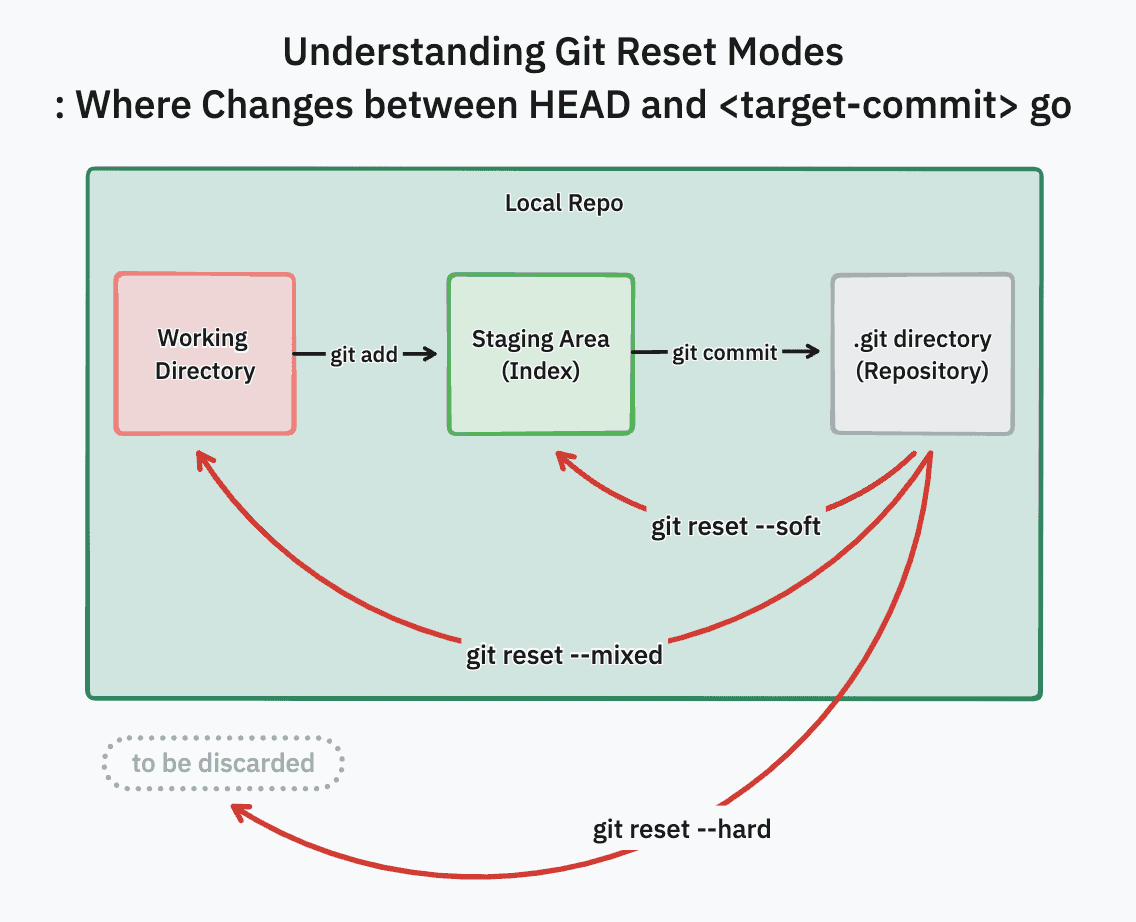
(The picture was so clean that I didn't need to write it myself.)
Git Stash
Temporarily saves changes without committing during work.
(When working on a branch, if a conflict occurs when working on another branch, or when working before creating an issue and then creating an issue and putting it there)
It has a stack structure.
- git stash apply
Applies the most recently saved stash.
- git stash apply stash
stash@{x}
Applies a specific stash.
- git stash --include-untracked
Applies stash to files that Git is not yet tracking.
- git stash list
Views the stash list.
- git stash pop
Applies the specified stash and removes it from the list. (As mentioned, it's a stack structure, so pop and apply do not remove the stash.)
Git Commit
Specifies the unit to be saved in the .git directory.
- git commit
Enter the file editor and write the commit.
- git commit -m
<message>
Writes a commit via message.
- git commit --amend
Adds the current staging value to the existing commit.
- git commit --allow empty
Writes a commit even if there are no changed files in staging.
Git Cherry-pick
Fetches only some commits from another branch.
It's infinitely easy if it's easy, and infinitely difficult if it's difficult.
- git cherry-pick
<commit-hash>
Fetches a specific commit.
- git cherry-pick
<commit-hash1><commit-hash2>
Fetches specific commits.
- git cherry-pick
<starting commit-hash>..<ending commit-hash>
Fetches by specifying a range.
Git Log
Outputs commit history.
git log
commit 354640841119741ad808723eb4818b5740f8d706 (HEAD -> feat/#366)
Author: youngsu5582 <98307410+youngsu5582@users.noreply.github.com>
Date:   Fri Aug 23 12:34:03 2024 +0900

    feat: Temporary comment for PR request

commit c152a277ebc5b752a998b35480ee5624ceab7452
Author: youngsu5582 <98307410+youngsu5582@users.noreply.github.com>
Date:   Fri Aug 23 12:14:42 2024 +0900

    fix: Move back inside member
Generally, it outputs like this.
Looking at it this way, it's too inconvenient to see the whole thing.
Let's try to use GitHub more efficiently in the next content.
空