Improving RestDocs Efficiently with Kotlin DSL (ver 1.0)
This content is based on an idea from Toss's article: #Creating a DSL with Kotlin: Escaping from Repetitive and Tedious REST Docs.
It also covers basic Kotlin grammar.
If you find any incorrect information about DSL or Kotlin, please leave a comment or email me atjoyson5582@gmail.com.
Disadvantages of RestDocs
In a previous project, I used SpringDoc for annotation-based documentation.
This was due to the following two points:
- Simple annotation-based documentation (I judged that it wouldn't be a major issue even if annotations were applied at runtime).
- Intentional separation of specification and implementation through interfaces (MemberControllerSpecification - MemberController).
However, this time I wanted to experience the pros and cons of RestDocs, so I decided to use it.
Advantages
The advantages I felt were:
- Since documentation is generated through tests, testing is enforced, which improves code quality (although this might depend on whether you use MockMVC or RestAssured).
- Writing documentation in Asciidoc (
.adoc) intentionally separates concerns (testing - documentation).
However, along with these advantages, I also felt many inconveniences.
Unnecessary Duplication in Request Creation and Field Documentation
private fun createRequest(
    purchaseType: String = "CARD",
    currency: String = "KRW",
    amount: Int,
    paymentKey: String,
    orderId: String,
    lottoPublishId: Long
): Map<String, Any> {
    return mapOf(
        "purchaseHttpRequest" to mapOf(
            "purchaseType" to purchaseType,
            "currency" to currency,
            "amount" to amount,
            "paymentKey" to paymentKey,
            "orderId" to orderId
        ),
        "lottoPublishId" to lottoPublishId
    )
}
When creating a request to be put into RestAssured like this,
elements like purchase, currency, and amount go into an object called purchaseHttpRequest.
Also, the type can be inferred from the type of each parameter (String, Int).
However, when it comes to field validation and documentation:
private fun commonRequestFields() = requestFields(
    fieldWithPath("purchaseHttpRequest").type(JsonFieldType.OBJECT).description("Purchase request information"),
    fieldWithPath("purchaseHttpRequest.purchaseType").type(JsonFieldType.STRING)
        .description("Purchase type (CARD, CASH, etc.)"),
    fieldWithPath("purchaseHttpRequest.currency").type(JsonFieldType.STRING)
        .description("Payment currency (KRW, USD, etc.)"),
    fieldWithPath("purchaseHttpRequest.amount").type(JsonFieldType.NUMBER).description("Payment amount"),
    fieldWithPath("purchaseHttpRequest.paymentKey").type(JsonFieldType.STRING)
        .description("Payment key (provided by the payment system)"),
    fieldWithPath("purchaseHttpRequest.orderId").type(JsonFieldType.STRING)
        .description("Order ID (provided by the payment system)"),
    fieldWithPath("lottoPublishId").type(JsonFieldType.NUMBER).description("Published lotto number"),
)- For cases like
purchaseTypeandcurrency, you have to add thepurchaseHttpRequestprefix. - You have to specify whether the type is STRING or NUMBER for each one.
Hassle of Setting Headers and Query Params
Most of the logic is handled in the Body, but sometimes you need to set Parameters or Headers.
RestAssuredRestDocumentation.document(
    requestHeaders(headerWithName("Authorization").description("Basic auth credentials")),
    queryParameters(parameterWithName("page").description("Page number to receive"))
)
It's difficult to manage this because it's only used in specific places (whether to generate request-headers or not).
RestAssuredRestDocumentation.document(
    "sample",
    requestHeaders(headerWithName("Authorization").description("Basic auth credentials")),
    RequestDocumentation.queryParameters(
        RequestDocumentation.parameterWithName(
            "page"
        ).description("Page number to receive")
    )
)
These values must be put into the document to be documented.
(And this also has the first disadvantage of duplication between the value and the field documentation.)
Unnecessary Separation for Identical Request and Response Structures
PayloadDocumentation.requestFields(
    fieldWithPath("purchaseHttpRequest").type(JsonFieldType.OBJECT).description("Purchase request information")
),
PayloadDocumentation.responseFields(
    fieldWithPath("purchaseHttpRequest").type(JsonFieldType.OBJECT).description("Purchase request information")
),
Setting the request and response like this is actually just
public static RequestFieldsSnippet requestFields(List<FieldDescriptor> descriptors) {
    return new RequestFieldsSnippet(descriptors);
}

public static ResponseFieldsSnippet responseFields(List<FieldDescriptor> descriptors) {
    return new ResponseFieldsSnippet(descriptors);
}
The parameters are the same; it's just that the returned Snippet is different.
Now, I will explain how I solved these disadvantages using a Kotlin DSL.
Kotlin Grammar
Before explaining the implementation method, I will first summarize the Kotlin grammar used.
(I was lacking in basic grammar as I used Kotlin for the first time in this side project..)
infix
The meaning is the same as that used in prefix and postfix.
Just as they denote something at the beginning and end, infix denotes something in the middle.
infix fun Int.add(other: Int): Int {
    return this + other
}

println(5 add 3) // 8
It allows you to call a function by its name only, omitting the caller dot (.) and parameter parentheses (()).
What if you want to make it usable only in a specific class?
class IntAdder {
    private val histories = mutableListOf<History>()

    fun add(left: Int, right: Int): Int {
        return left add right
    }

    infix fun Int.add(other: Int): Int {
        histories.add(History(this, other))
        return this + other
    }
}
You can declare it inside a class like this. (Sometimes private is not declared.)
Extension Lambdas
class Person(val name: String)

fun introduce(block: Person.() -> Unit) {
    val person = Person("Alice")
    person.block()
}

fun main() {
    introduce {
        println("Hello, my name is $name")
        //"Hello, my name is Alice"
    }
}
At first, I had a hard time understanding this part.
The block: Person.() -> Unit part is the extension lambda.
- When the
introducefunction is executed,val person = Person("Alice")is created. - Then, the
println("Hello, my name is $name")function is executed inside the Person class.
(This is whythis.orperson.is omitted from$name)
Just looking at this explanation, you might think, "Why would I use this?"
Looking briefly at the content to be explained in the DSL section below:
fun setRequest(
    endpoint: String,
    method: HttpMethod = HttpMethod.POST,
    block: DslContainer.() -> Unit)
{
    ...
}

fun DslContainer.body(block: DslBuilder.() -> Unit) {
    body.apply(block)
}

.setRequest("/api/orders", HttpMethod.POST) {
    body {
            "lottoPublishId" type DocsFieldType.NUMBER means "Unique identifier of the approved lotto issuance"
        }
}
The principle behind how the .setRequest(...) part works is:
From the DslContainer class -> call the body extension function -> from the DslBuilder class -> use String.type. (Very difficult...)
To put it simply, you can think of it as executing with the class I want inside the { ... }.
Scope Functions
These are functions that help you write object initialization and configuration conveniently.
data class Person(var name: String, var age: Int)

val person = Person().apply {
    name = "Alice"
    age = 25
}
You can configure it conveniently without calling this. Additionally, it helps to configure the object in various ways.
(Of course, the member variables can be changed with the var keyword).
The return value is the modified object after the apply call.
object, data object
object Logger {
    fun log(message: String) {
        println("LOG: $message")
    }
}

data object AppConfig {
    val version = "1.0.0"
    val apiUrl = "https://api.example.com"
}


fun main() {
    Logger.log("Hello!")
}
Commonly, it's a singleton pattern (no direct instance creation, initialized only once when the program starts).
It seems you can use object when you want to create a utility function, and data object when you want to store constants.
(toString, equals, hashCode are automatically generated).
DSL
From this part on, it is my own version adopted from the Toss article.
ApiField
data class ApiField(
    val path: String,
    val docsFieldType: DocsFieldType,
    var value: Any,
    var description: String,
    var optional: Boolean,
    var children: List<ApiField> = emptyList()
)path: object pathdocsFieldType: type to be recorded in the document
sealed class DocsFieldType(val type: JsonFieldType) {
    open val format: String? = null

    data object NUMBER : DocsFieldType(JsonFieldType.NUMBER)
    data object STRING : DocsFieldType(JsonFieldType.STRING)
    data object BOOLEAN : DocsFieldType(JsonFieldType.BOOLEAN)
    data object OBJECT : DocsFieldType(JsonFieldType.OBJECT)
    data object DATE : DocsFieldType(JsonFieldType.STRING) {
        override val format = "yyyy-MM-dd"
    }
    data object DATETIME : DocsFieldType(JsonFieldType.STRING) {
        override val format = "yyyy-MM-dd HH:mm:ss"
    }

    data class ARRAY(val elementType: DocsFieldType) : DocsFieldType(JsonFieldType.ARRAY)

    data class ENUM<T : Enum<T>>(val enums: Collection<T>) : DocsFieldType(JsonFieldType.STRING) {
        companion object {
            inline fun <reified T : Enum<T>> of(): ENUM<T> {
                return ENUM(T::class.java.enumConstants.asList())
            }
        }
    }

}
ARRAY and ENUM allow for dynamic use by holding values internally.
(Elements inside an array or values of ENUM elements)
value: The actual value to be included in the requestoptional: Whether it is mandatorydescription: The description to be recorded in the documentchildren: Sub-elements to have if it is an object
DslBuilder
class DslBuilder {
    internal val fields = mutableListOf<ApiField>()

    infix fun String.type(docsFieldType: DocsFieldType): ApiField {
        val field = ApiField(
            name = this, docsFieldType = docsFieldType,
            value = "",
            description = "",
            optional =false,
        )
        fields.add(field)
        return field
    }
}
Create an inline function inside DslBuilder.
When called, it creates an ApiField and adds it to the Builder.
The reason for doing this is to create it by calling an inline function without a comma or direct call, while still having the Builder hold the value.
infix fun ApiField.means(description: String): ApiField {
    this.description = description
    return this
}

infix fun ApiField.value(value: Any): ApiField {
    this.value = value
    return this
}

infix fun ApiField.optional(flag: Boolean): ApiField {
    this.optional = flag
    return this
}

infix fun ApiField.withChildren(block: DslBuilder.() -> Unit): ApiField {
    val childBuilder = DslBuilder()
    childBuilder.block()
    this.children = childBuilder.fields
    return this
}
Then, insert each value through the ApiField infix.
"purchaseHttpRequest" type DocsFieldType.OBJECT means "Payment approval HTTP object" withChildren {
    "purchaseType" type DocsFieldType.ENUM.of<PurchaseType>() means "Purchase type" value purchaseType
    "amount" type DocsFieldType.NUMBER means "Payment amount to cancel" value amount
    "paymentKey" type DocsFieldType.STRING means "Payment identifier to cancel - provided by payment system" value paymentKey
}
If there is a DEPTH, I made it possible to set the internal value through withChildren.
DslContainer
class DslContainer {
    val headers = DslBuilder()
    val body = DslBuilder()
    val queryParams = DslBuilder()
    ...

    fun DslContainer.headers(block: DslBuilder.() -> Unit) {
        headers.apply(block)
    }

    fun DslContainer.body(block: DslBuilder.() -> Unit) {
        body.apply(block)
    }

    fun DslContainer.params(block: DslBuilder.() -> Unit) {
        queryParams.apply(block)
    }
}
Then, create a Container that has all of headers, body, and queryParam like this.
body {
    ...
}
headers {
    ...
}
params {
    ...
}
You can set the necessary parts among body, headers, and param.
fun convertBody() = body.toValue()
fun convertBodyDescriptors() = body.toFieldDescriptors()
You can convert it to the value to be put in the request and the field description.
fun List<ApiField>.toConvertValue():Map<String,Any>{
    fun processField(field: ApiField): Any {
        return if (field.children.isNotEmpty()) {
            field.children.associate { it.name to processField(it) }
        } else {
            field.value
        }
    }
    return this.associate { it.name to processField(it) }
}
fun List<ApiField>.toFieldDescriptors(): List<FieldDescriptor> {
val descriptors = mutableListOf<FieldDescriptor>()
fun processField(field: ApiField, parentPath: String = "") {
val fullPath = if (parentPath.isEmpty()) field.name else "$parentPath.${field.name}"
fun getArrayPath(type: DocsFieldType, path: String): String {
return when (type) {
is DocsFieldType.ARRAY -> getArrayPath(type.elementType, "$path[]")
else -> path
}
}
val formattedPath = getArrayPath(field.docsFieldType, fullPath)
val descriptor = fieldWithPath(formattedPath)
.type(field.docsFieldType.type)
.description(
field.description +
if (field.docsFieldType is DocsFieldType.ARRAY) {
" (element type: ${getArrayTypeString(field.docsFieldType.elementType)})"
} else "" + (field.docsFieldType.format?.let { " (format: $it)" } ?: "")
)
.attributes(
Attributes.Attribute("optional", field.optional.toString().uppercase())
)
descriptors.add(descriptor)
field.children.forEach { processField(it, formattedPath) }
}
this.forEach { processField(it) }
return descriptors
}A peculiar feature is the recursive function format. The following becomes possible:
If it is an OBJECT with sub-elements, keep setting by adding the path (purchaseRequest -> currencyRequest -> id)
If it is an ARRAY with sub-elements, get the sub-type and describe it
=> This allows you to set values and create documents as intended.
DocsDsl
This is the long-awaited DSL.
(Since it even executes the request, it's closer to a DSL, but for now, I've used a clear name.)
class DocsApiBuilder(private val documentName: String) {

    private var endpoint: String = ""
    private var requestContainer: DslContainer = DslContainer()
    private var method: HttpMethod = HttpMethod.POST
    private var responseContainer: DslContainer = DslContainer()
fun setRequest(
endpoint: String,
method: HttpMethod = HttpMethod.POST,
block: DslContainer.() -> Unit
): DocsApiBuilder {
this.endpoint = endpoint
this.method = method
this.requestContainer = DslContainer().apply(block)
return this
}Set the request.
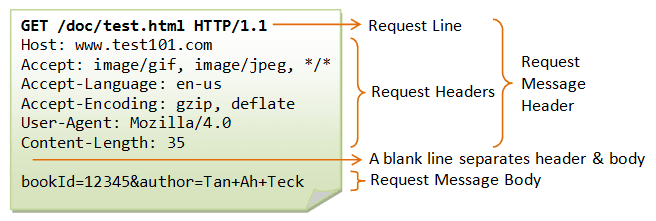
For a fundamental Http Request Message,
Request Line (HTTP METHOD, URL)Request HeaderRequest Body
is the format, but since it was more convenient for me to put everything intosetRequestwhen I used it, I implemented it this way.
fun execute(log: Boolean = false): DocsApiValidator {
    if (log) {
        printLog()
    }
    try {
        var requestSpec: RequestSpecification = RestAssured.given().log().all()
            .contentType(ContentType.JSON)
            .filter(
                RestAssuredRestDocumentation.document(
                    documentName,
                    HeaderDocumentation.requestHeaders(requestContainer.convertHeadersDescriptors()),
                    PayloadDocumentation.requestFields(requestContainer.convertBodyDescriptors()),
                )
            )
            .headers(requestContainer.convertHeaders())
            .queryParams(requestContainer.convertQueryParams())
            .body(requestContainer.convertBody())
        val response = requestSpec
            .filter(
                RestAssuredRestDocumentation.document(
                    documentName,
                    HeaderDocumentation.responseHeaders(responseContainer.convertHeadersDescriptors()),
                    SUCCESS_SNIPPET.andWithPrefix("data.", responseContainer.convertBodyDescriptors())
                )
            )
            .request(method.toMethod(), endpoint)
            .then()
            .extract()
        return DocsApiValidator(response)
    } catch (e: Exception) {
        throw IllegalStateException("An error occurred during API documentation: ${e.message}", e)
    }
}
Inject values into Header, Param, Body and document them.
private fun printLog() {
    println("=== DocsApiBuilder ===")
    println("Document: $documentName")
    println("Endpoint: $endpoint")
    println("Request:")
    requestContainer.printRequestInfo()
    println("Response:")
    responseContainer.printRequestInfo()
}
Request: =================================
Headers:
Body:
- Path(lottoPublishId) Type(NUMBER): Description(Ordered receipt ID) Value(1)
- Path(purchaseHttpRequest) Type(OBJECT): Description(Payment approval HTTP object)
- Path(purchaseType) Type(ENUM): Description(Purchase type) Value(CARD)
- Path(currency) Type(ENUM): Description(Payment currency type) Value(KRW)
- Path(amount) Type(NUMBER): Description(Payment amount to cancel) Value(1000)
- Path(orderId) Type(STRING): Description(Order number to cancel) Value(order-id-1)
- Path(paymentKey) Type(STRING): Description(Payment identifier to cancel - provided by payment system) Value(paymentKey-id-1)
QueryParams:
Response: =================================
Headers:
Body:
- Path(purchaseResponse) Type(OBJECT): Description(Response data)
- Path(id) Type(STRING): Description(Unique identifier of the canceled payment)
- Path(amount) Type(NUMBER): Description(Canceled payment amount)(There is also a logging method to easily check the status. 🙂)
Conclusion
DocsApiBuilder("purchase-ticket-success")
    .setRequest("/api/tickets", HttpMethod.POST) {
        body {
            "lottoPublishId" type NUMBER means "Ordered receipt ID" value 1
            "purchaseHttpRequest" type OBJECT means "Payment approval HTTP object" withChildren {
                "purchaseType" type ENUM.of<PurchaseType>() means "Purchase type" value PurchaseType.CARD
                "currency" type ENUM.of<Currency>() means "Payment currency type" value Currency.KRW
                "amount" type NUMBER means "Payment amount to cancel" value 1000
                "orderId" type STRING means "Order number to cancel" value "order-id-1"
                "paymentKey" type STRING means "Payment identifier to cancel" value "paymentKey-id-1"
            }
        }
        headers {
            "Payment-Error-Header" type STRING means "Toss arbitrary error code" value "EXCEED_MAX_ONE_DAY_AMOUNT" optional true
        }
    }.setResponse {
        body {
            "purchaseResponse" type OBJECT means "Response data" withChildren {
                "id" type STRING means "Unique identifier of the canceled payment"
                "amount" type NUMBER means "Canceled payment amount"
            }
        }
    }.execute(true)
    .statusCode(200)
The previously separate request specification writing and request value injection are combined,
and you can write it in a format similar to JSON.
(Even if other developers look at it, it is clearly documented. 🙂)
And another advantage is
import config.AcceptanceTest
import docs.DocsApiBuilder
import docs.HttpMethod
import docs.field.DocsFieldType.*
import docs.request.DslContainer
Documentation-related dependencies are cohesive, so no dependencies on Spring RestDocs are generated.
Ver 2.0?
Currently, I created a DSL because I found an interesting element while implementing the lottery.
So, I have finished it for now, although there are some parts that were rushed or are somewhat disappointing.
"lottoPublishId" type NUMBER means "Ordered receipt ID" value 1This was an element I was initially dissatisfied with, but I couldn't solve it.
I don't know much about Kotlin, but I think type NUMBER and value 1 are ultimately the same element.
I think it would be possible to simplify documentation and request creation by getting rid of type and just putting in value.
Infer the type at runtime and convert a specific type -> DocsFieldType
=== Member lookup failed

==== Token not present
Fails if sent with an inappropriate token.

include::{snippets}/info-fail-not-valid-token/index.adoc[]
RestDocs requires you to create the index.adoc document yourself.
At this time, while there is the advantage of separation of documentation and code, the difficulty of management and hassle were too great.
tasks.register("generateSnippetIndexes") {
    val snippetsDir = file("build/generated-snippets")
    snippetsDir.listFiles { file -> file.isDirectory }?.forEach { snippetFolder ->
        val includeFiles = listOf(
            "http-request.adoc",
            "http-response.adoc",
            "request-fields.adoc",
            "response-fields.adoc"
        )
        val includesContent = includeFiles
            .filter { File(snippetFolder, it).exists() }
            .joinToString("\n") { "include::${it}[]" }
        val indexFile = File(snippetFolder, "index.adoc")
        indexFile.writeText(includesContent)
        println("Generated index.adoc in ${snippetFolder.name}:")
        println(includesContent)
    }
}
(I added a task that automatically bundles them, but it wasn't a core solution to the inconvenience.)
Based on Custom Annotations,
@Titleis the document title(Depth2)@SubTitleis the document sub-title(Depth3)@Detailis the document sub-sub-title(Depth4)@Content(...)is the document body
It seems that dynamic generation in a similar way would also be possible.
However, it seems that the documentation is deeply invading the test, so I need to consider the pros and cons a little more.
This is the PR where I worked on the above content, and this is the repository.